Context
Since mid-2024, demand for DRAM and NAND has risen sharply following the massive growth of generative AI. This has created tension in the market and led to a sharp increase in prices (between 100 and 400%) for DIMM and NVMe. In order to limit the business impact on medium and large-scale infrastructures, it is necessary to find ways to optimize available resources, particularly on hypervisors.
Fortunately, there is a cool feature present in Linux kernel since version 2.6.32 (2009) called Kernel Same page Merging (KSM). It was developed primarily by Red Hat to improve memory efficiency for virtualisation workloads (especially KVM).
In this blogpost we’ll see how it works and how to configure it safely to reduce memory usage.
How does it work ?
When you’re running multiples virtual machines on hypervisors, especially with the same OS/programs, some libraries are loaded multiples times in RAM (glibc, JVM, Python, etc.). Understand, each VM has its own copy of identical memory pages.
To avoid this, KSM is able to detect and deduplicate same memory pages. But this isn’t magic, all memory pages aren’t eligible to merging.
But what KSM deduplicate :
- Only anonymous (private) memory pages are eligible: heap/stack/anonymous mappings, typically from malloc(), anonymous mmap(), JIT heaps, VM guest RAM mappings, etc.
- Application using
madvise(MADV_MERGEABLE)
KSM will never deduplicate pagecache (file) pages.
You can find here KSM kernel documentation.
Deduplication takes place in three steps:
With eligible pages, it will create rmap_item structure to track page hash.
If multiples pages with the same hash are found, it will insert it into unstable tree which contain all pages candidates to merge. Then it will compare pages with same hash byte-by-byte.
If two pages are identical, one physical page is kept, other pages are remapped to it, and, page is write-protected and inserted in stable tree. Now multiple processes map the same physical page.
KSM is continuously scanning pages and can merge more than two pages. It will also unmerge pages if needed.
There is also a smart_scan feature that can be enable to avoid rescan pages if deduplication has failed on previous scan.
Performance trade-off
Even this method allow pretty good memory saving, higher virtual machine density and better cache utilization (reduce cache miss for KVM guest) this is not free.
This lead to higher CPU usage due to scanning and hashing operation, extra page faults due to write-protection and possible latency spikes on write-heavy workloads.
Smart_scan feature and different tuning can help to reduce CPU consumption.
Requirements
The only requirement is to have kernel compiled with CONFIG_KSM=y, but almost all distributions have this setting enabled.
To check:
1 | cat /boot/config-$(uname -r) |grep CONFIG_KSM |
You also need to note that KSM work better on smaller page size. If you got hugepages enabled, it may be disappointing.
First steps with KSM
KSM got small daemon called KSMd with options and counters available into /sys/kernel/mm/ksm/.
All options and counters are readable by all but options are writeable only by root.
Main options
run :
Set 0 to stop ksmd
Set 1 to run ksmd
Set 2 to stop ksmd and unmerge all merged pages
pages_to_scan: Number of pages to scan before sleep (default 100), I recommend to put it between 3000 and 9000 depending of quantity of RAM installed and pressure you can accept on CPU.
sleep_millisecs: sleeping time before each scan, default is 20, increase it if you want to reduce CPU pressure.
merge_across_nodes: specifies if pages from different NUMA nodes can be merged, activated by default, you can disable it to avoid performance degradation on multiple numa node (low latencies applications).
smart_scan: enabled by default on recent kernel versions, allow to avoid rescan pages that cannot be merge. To check efficiency monitor pages_skipped counter.
max_page_sharing: maximum sharing allowed for each KSM page. This help in case of Numa balancing, so disable merge_across_nodes need to be enabled before decreasing this (default 256).
For other options (particulary advisor) please go check official kernel documentation
Counters
It’s pretty important to check if KSM is working properly.
Because KSM using rmap_item to compare pages, it consume RAM, and you need to check if this is profitable. To achieve this, you can check general_profit counter (available since Linux 6.4). It used the following formula:
1 | general_profit =~ ksm_saved_pages * sizeof(page) - (all_rmap_items) * sizeof(rmap_item); |
Be careful, general_profit is cumulative size saved since boot. To display current saving pages, you need to read pages_sharing. But this doesn’t take into account rmap_item total size and number of deduplicated pages. To perfectly monitor memory gain, external monitoring tool is better.
To display all pages counters:
1 | grep -H '' /sys/kernel/mm/ksm/pages_* |
You can also check the following counters :
full_scans: How many times all mergeable areas have been scanned
stable_node_chains: the number of KSM pages that hit the max_page_sharing limit, if this counter is too high and you got CPU time available, increase max_page_sharing. For example, in one of my cases I got 74, so increase latencies to gain 296KiB of RAM isn’t a good trade-off.
You can also check for each PID KSM stats (since Linux 6.1):
1 | cat /proc/<pid>/ksm_stat |
Let’s test it out
For this experience, I took an hypervisor in production with the following specs :
- 1TB of installed RAM
- Dual AMD EPYC 7543 (total of 64c/128t)
It is currently running 215 virtual machines (only Linux and mainly Ubuntu server). Current RAM consumption is stable (~607GiB).
CPU usage is also stable ~20%.
I’m setting pages_to_scan value to 9000 because CPU usage is low so high value isn’t an issue.
And on Grafana I can see the following behavior :
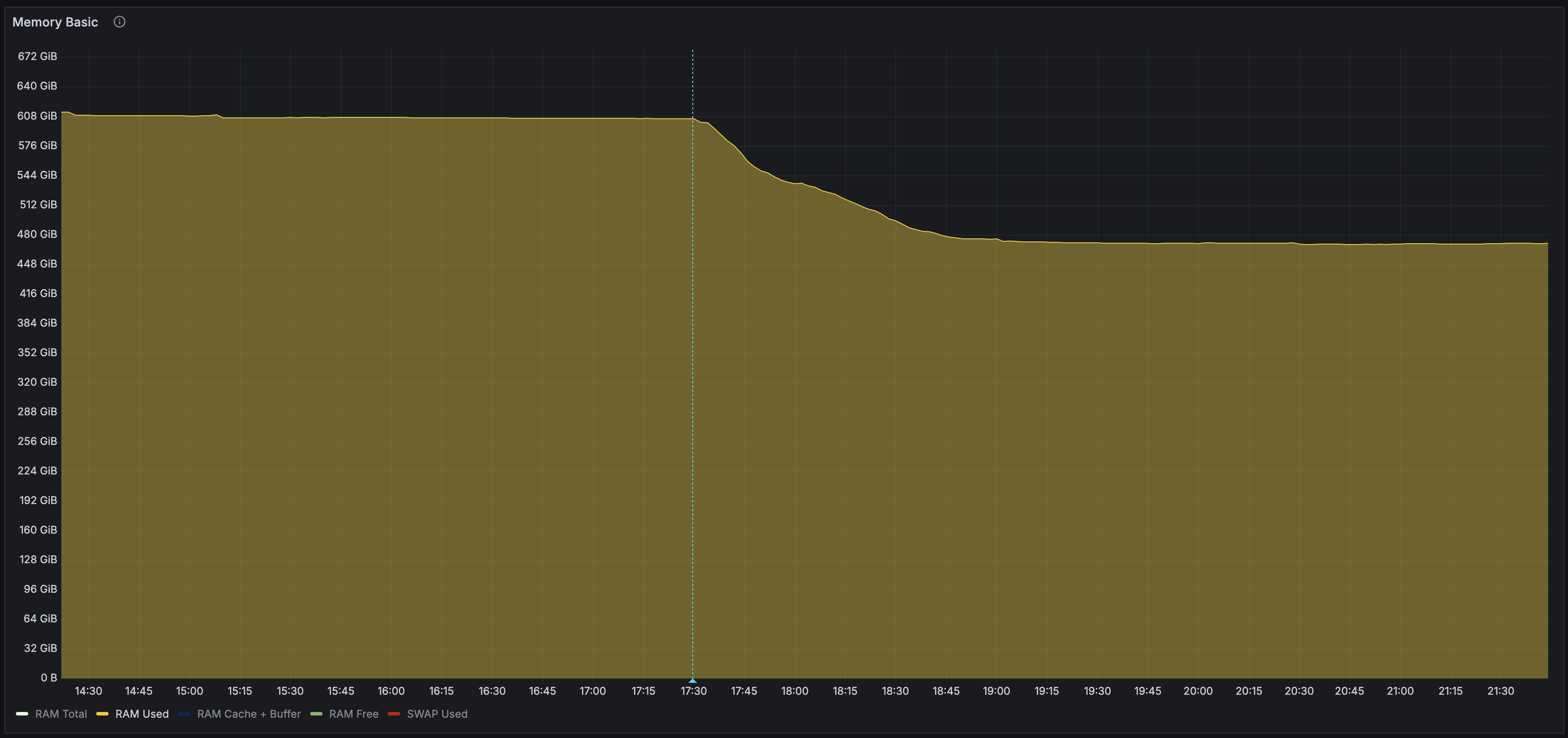
We can see high RAM consumption reduction from ~608GiB to ~473GiB, so around 134GiB which represent ~22% memory gain.
I’ve performed the same operation on multiples hypervisors with different numbers of VMs (between 20 and 280) and I can observe gain between 15% and 25% (not always linear with VM count).
Now, we need to check CPU overhead to be sure we don’t slow down too much our hypervisor :
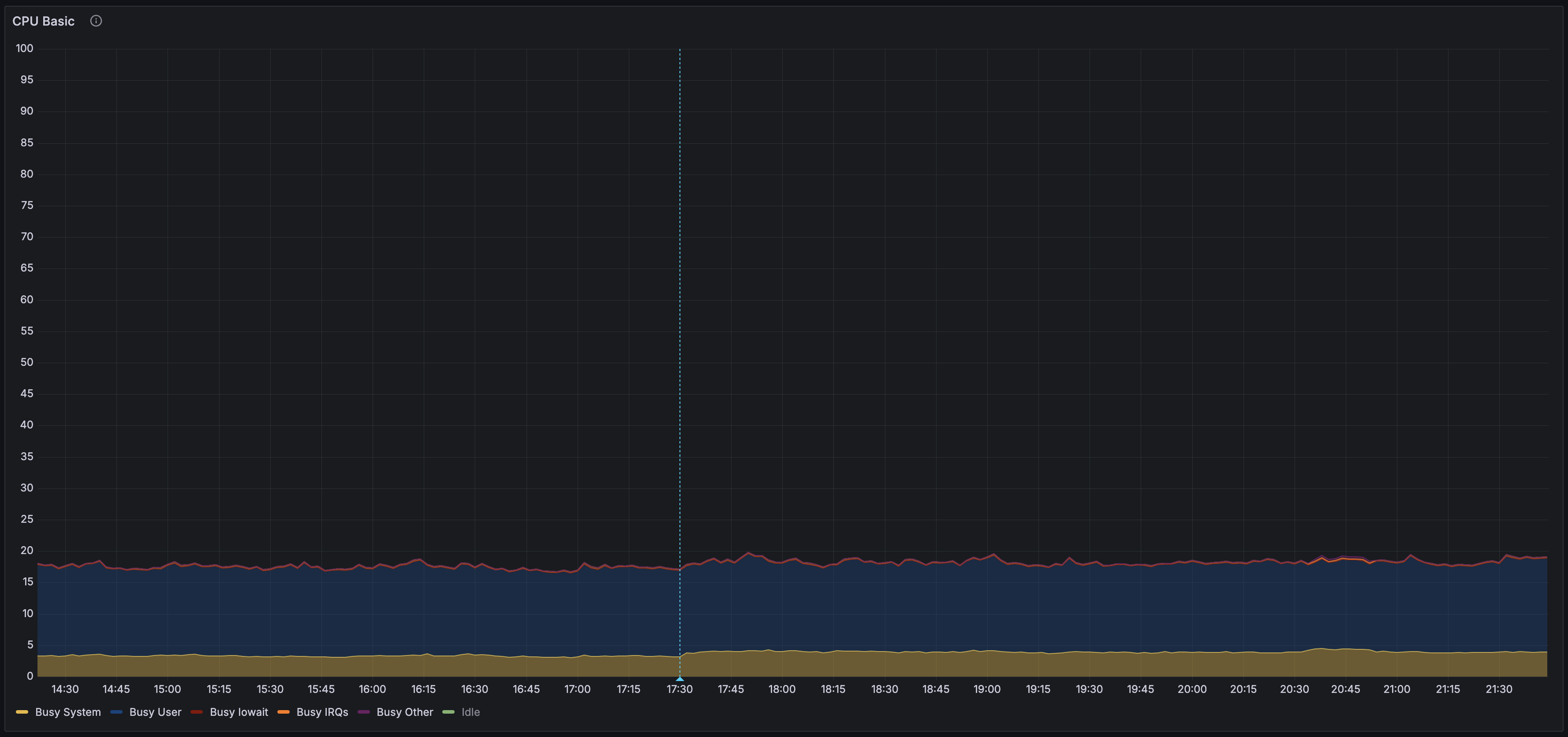
We can see Busy system metric up from ~3.15% to ~4.12% so we need ~1% of CPU time to save 22% of RAM. CPU usage isn’t linear with memory used and after the firsts passes of scan CPU usage decrease a bit (~3.85%).
To avoid changing settings everytime manually by looking CPU usage you can check ksmtuned which adjust ksm parameters automatically.